Your roof already
makes the power.
Stop selling it back at a loss.
On NEM 3.0, your utility buys your surplus solar for pennies — then sells it back at rush-hour rates to charge your Tesla overnight. SolarSmartCharge closes that gap: it routes surplus straight into your car, amp-by-amp, in real time.
You're selling sunshine at a loss.
Under California's newest net-metering rules, exported solar earns a fraction of what the grid charges to power your car after dark. SolarSmartCharge keeps that spread on your side of the meter.
See your own number, not ours.
Every home is different. Slide in your driving and your rates — this estimates what charging on surplus solar could keep in your pocket.
Four steps, then you never think about it again.
No installer visit, no breaker panel work, no new box on the wall. It's all software — connect two accounts and pair a key.
Connect your Tesla
One click through Tesla's official OAuth. We read charge state and set amps — nothing else. Your password never reaches our servers.
Link your solar
Tesla Solar connects automatically with your Tesla account. SolarEdge takes one monitoring API key, pasted once.
Pair the virtual key
A one-time handshake between your phone and the car's touchscreen. Every command is signed with a key your car checks — and the only ones we ever send are charging: amps, limit, start, stop, plus a wake so the car can hear them. Remove the key from the car, or revoke access in your Tesla Account, whenever you want.
Plug in on a sunny day
That's the last thing you do. When surplus appears, charging ramps up. When clouds roll in, it eases off. You just watch the savings.
A closed loop that chases zero grid import.
This isn't a schedule or a timer. It's a proportional controller reading real power flow and correcting every cycle — the same idea as cruise control, pointed at your meter.
Watch it happen, in your pocket.
The whole point is that you don't have to babysit it — but when you glance, you see exactly what's flowing where, and what you've saved.
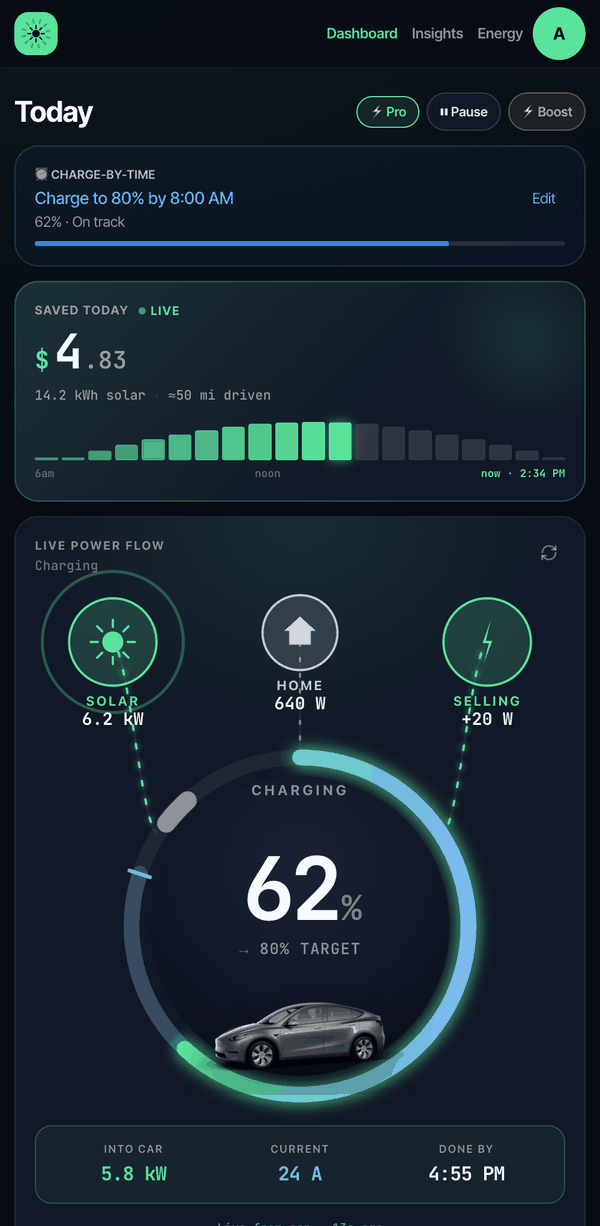 Dashboard · live power flow
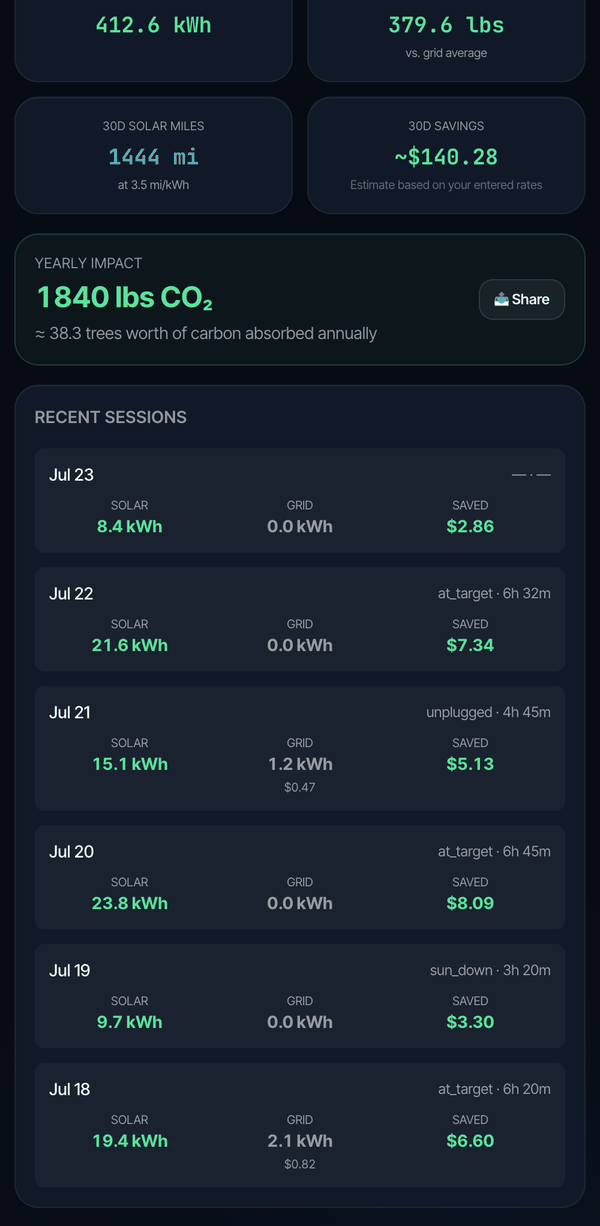 Sessions · savings history
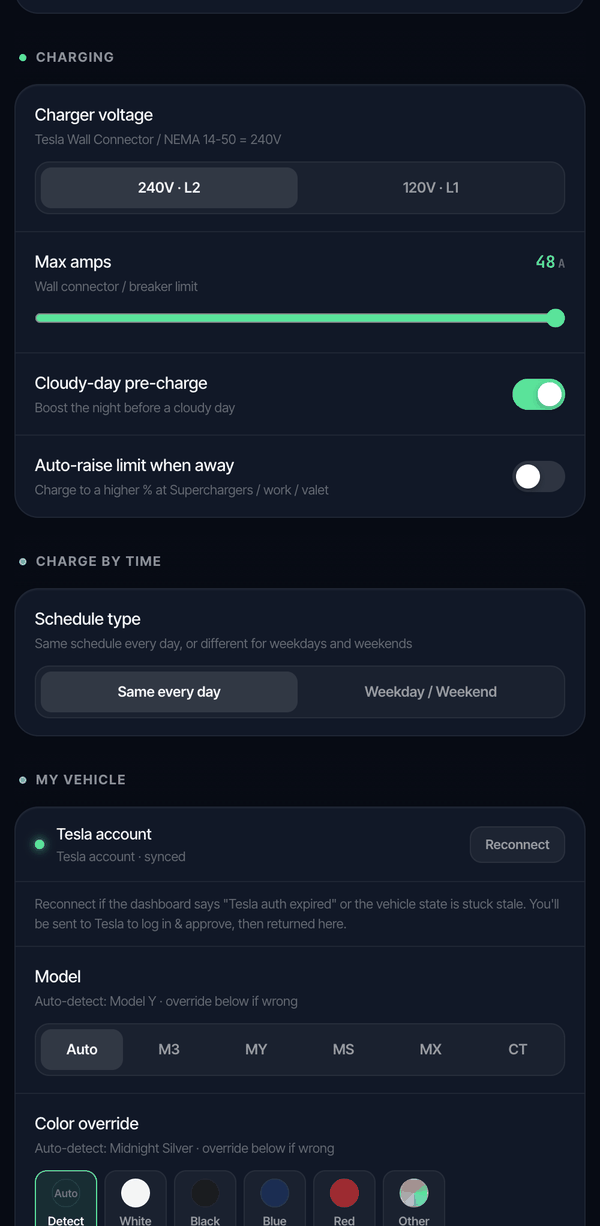 Settings · charging controls
Works with the solar you already have.
No Powerwall, no battery, no gateway. If you've got panels and a Tesla, you're the whole install — and you don't need a supported inverter to start.
Tesla Solar
Panels without a Powerwall. Production reads straight from your Tesla account — nothing to paste, nothing to configure.
Auto-connected →Every other system
SMA, Fronius, a string inverter with no API — no problem. Tell us your system size and we estimate production from live irradiance for your roof, then auto-calibrate.
No API key needed →SolarEdge
HD-Wave and StorEdge inverters, read through the monitoring API for metered precision.
Paste one API key →Enphase
Microinverter systems via the Enlighten API.
Coming soonBuilt by someone who got tired of doing this by hand.
Checking the weather, doing the math, changing the amps, remembering to set it all back before a trip. That's the part you hand over.
Real-time solar tracking
Re-reads your solar every 5 minutes and corrects the amps to match — metered from your inverter, or modelled from live irradiance for your roof. No schedules to maintain.
Official Fleet API
OAuth only — your password never touches us. Every command is cryptographically signed with a key your car trusts.
Boost & departure
Need to leave in an hour? One tap overrides to full power, then returns to solar mode automatically.
Safe by default
Superchargers are auto-detected and never interfered with. A surplus threshold prevents churn on cloudy days.
Savings you can see
Every session logs solar kWh, grid kWh avoided, CO₂, and dollars saved against your real utility rate.
Restores your settings
We save your charge limit and amps first, then put them back exactly when the session ends. Car's always trip-ready.
One plan. It pays for itself in a week of sun.
For most drivers the trial pays for a year of Pro many times over. Run your own estimate, then start 30 days free — no card, cancel in one tap.
- ✓Automatic solar charging control
- ✓Live power-flow dashboard
- ✓Charge-by-time (solar + grid hybrid)
- ✓Daily & 30-day savings tracking
- ✓Boost mode & weather-aware charging
No credit card required
The questions everyone asks first.
Still curious? Everything runs on Tesla's official API with your explicit consent, and you can pause or disconnect anytime.
Can I charge my Tesla from solar without a Powerwall?
Yes. SolarSmartCharge monitors your solar production in real time and adjusts your Tesla's charging amps to match your surplus — no Powerwall or battery storage needed. It works with Tesla Solar panels and SolarEdge inverters.
How is this different from Tesla's built-in Charge on Solar?
Charge on Solar needs a Powerwall. Tesla lists a Powerwall with solar on site among its minimum requirements, and their support FAQ answers the question directly: it only works with one. If you already own a Powerwall, that feature may be all you need — it's built into the app you already have. SolarSmartCharge is for the much larger group with panels and no home battery. We read your solar production directly and match your car's amps to the surplus, so the battery never has to be part of the equation.
How does it actually work?
Every 5 minutes it reads your solar production and home consumption. A closed-loop controller calculates the exact charging amps to drive grid import toward zero. Exporting surplus? It ramps up. Clouds roll in? It ramps down — automatically, no scheduling.
What solar systems does it support?
Tesla Solar connects automatically through your Tesla account, and SolarEdge via a monitoring API key. Enphase support is coming soon — Enphase homes work great in estimate mode meanwhile. Every other system — SMA, Fronius, a string inverter with no API at all — works from your system size plus live irradiance for your roof, which we auto-calibrate over time.
How much can I actually save?
On California NEM 3.0, you earn ~$0.05/kWh exporting solar but pay ~$0.39/kWh charging from the grid. Charging from your own solar instead saves ~$0.34/kWh. What that adds up to depends on how much you charge at home: a light driver might save $15–30/month, a daily commuter $80–100+. Estimates based on your utility rates, not a guarantee.
Is it safe? Will it damage my car?
It uses Tesla's official Fleet API with OAuth. Your password never touches our servers, and every command is cryptographically signed. The only commands we ever send are charging ones — amps, limit, start, stop — plus a wake so the car can receive them. DC fast chargers (Superchargers) are auto-detected and never interfered with, and you can pause, override, or revoke our access in your Tesla Account at any time.
What does it cost?
Pro is $10/month or $79/year, with a free 30-day trial — no credit card required.
Every sunny day you wait is money on the meter.
Connect your Tesla and your solar in five minutes. Watch the next sunny afternoon pay for itself.
Start your free 30-day trial